Quick answer
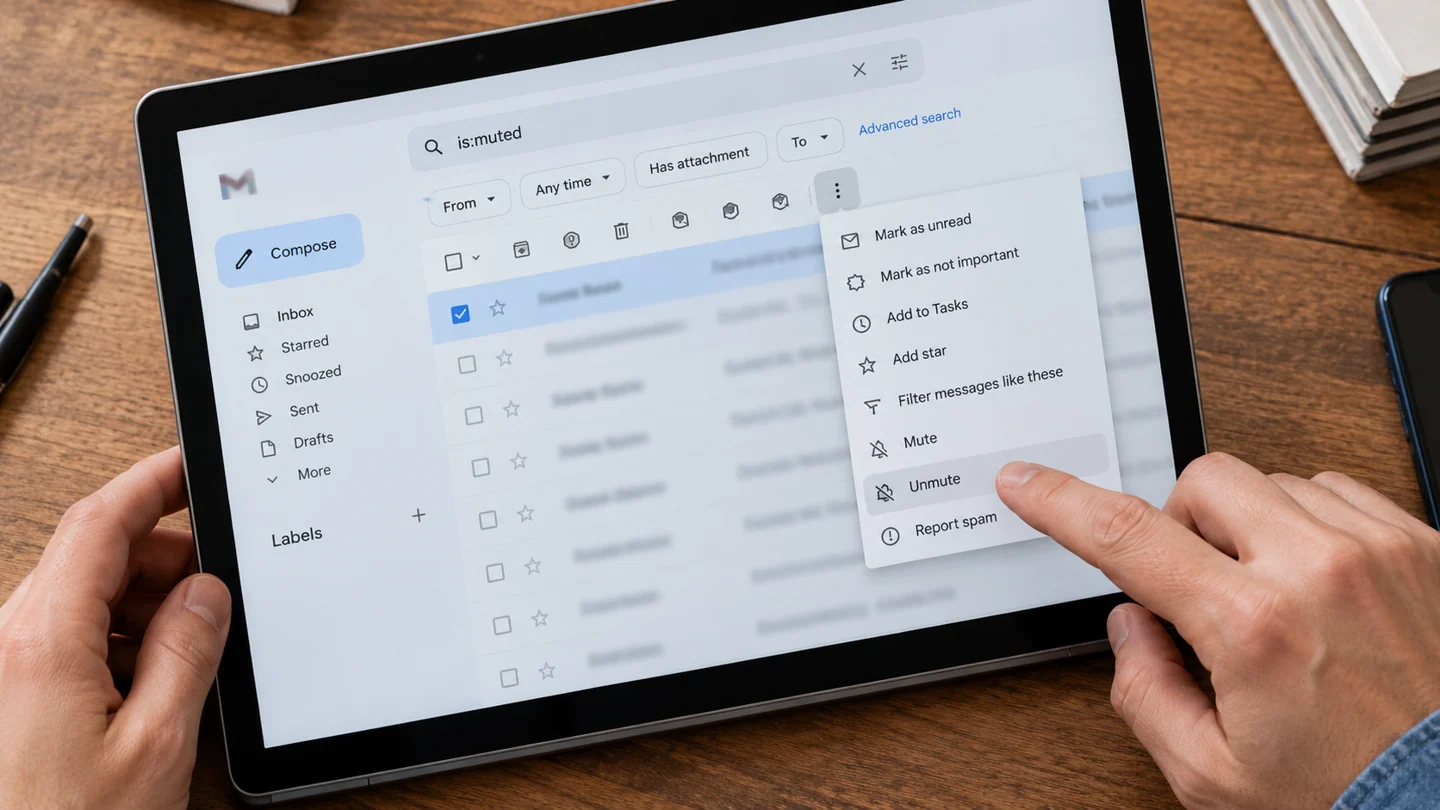
Check whether the conversation is muted. A muted thread can send replies to the archive under Gmail's documented rules.
Understand the issue
Compare a missing reply with another message from the same sender. This helps distinguish a conversation-level setting from a broader filter or account issue. Keep the conversation intact while investigating instead of asking everyone to resend it.
Step-by-step checks
- Search for the conversation, including muted messages.
- Inspect its muted status.
- Unmute it if you want ordinary inbox handling restored.
Need help with this issue?
Share your model and symptoms. Confirm availability and the quote before booking.
What the results mean
If other unrelated messages also skip the inbox, investigate filters and other settings separately.
| Stage | Action |
|---|---|
| Start | Search for the conversation, including muted messages. |
| Compare | Inspect its muted status. |
| Next step | Unmute it if you want ordinary inbox handling restored. |
Check the account and message before changing mail settings
Confirm the account, mailbox and exact message involved. Several accounts can be open in one browser or mail app, making it easy to search or edit the wrong one. Use a known sender, subject and approximate date as your reference, while keeping message contents and addresses private in support screenshots.
Separate appearance from message state. A collapsed thread, hidden category, active filter or selected folder can make a message seem absent without deleting it. Likewise, a sharing link is different from an attached file, and a draft setting is different from a confirmed delivery. Check what the service actually reports rather than relying only on a successful click.
Test one harmless message or draft where appropriate before changing defaults for all mail. Review forwarding, sharing and automatic content downloads carefully because they affect privacy as well as convenience. After a change, confirm the intended account still sends, receives and displays mail correctly. Avoid removing accounts or deleting local archives as an early troubleshooting step; some messages or drafts may not have another copy.
Before you finish
- Correct account selected
- Known message and folder identified
- View settings distinguished from delivery state
- Private message data kept out of screenshots
Repair checklist
If you need help, send RJ Computers your device model and the results of the checks above. Explain what must be preserved before work starts, especially files that have no other copy.
- Confirm assessment charges and what the quote includes.
- Ask for approval before additional parts or destructive software changes.
- Test the original symptom at handover and keep the repair details.
Ready for an assessment?
Share your model and symptoms. Confirm availability and the quote before booking.
Frequently asked questions
Does muting delete the existing conversation?
No. It changes how the thread is handled rather than deleting its contents.
What should I record before requesting help?
Record the full model, exact error or symptom, recent changes and what you already tried. Explain whether important files have a separate backup.
How do I arrange a repair assessment?
Call RJ Computers on +91 99715 24677 or use the WhatsApp booking button. Confirm availability, diagnostic fees and the scope of work before booking.
Conclusion
If other unrelated messages also skip the inbox, investigate filters and other settings separately.
Further reading: Official product guidance